


Getting started
Our new Somerset Timbers website is now live, bringing with it a faster, more convenient, and user-friendly way to shop. You can browse our full product range, place orders, and pay online at any time, making it easier than ever to get the timber you need, when you need it. Whether you are ordering for delivery or collection, our new platform is designed to give you a smooth and enjoyable shopping experience.
Existing customers
To make things even easier, we have already uploaded email addresses for customers who have shopped with us over the past two years.
Before registering a new account, we recommend clicking on the Log In icon first. Enter your email address and select Forgot password. You will receive a password reset link via email, allowing you to create a new password. Once completed, simply return to the log in page, enter your email address and password, and you are ready to start shopping online.
New customers
If you are new to Somerset Timbers, this guide will help you register an online account so you can shop with ease and convenience whenever it suits you.
Step 1: Start your registration
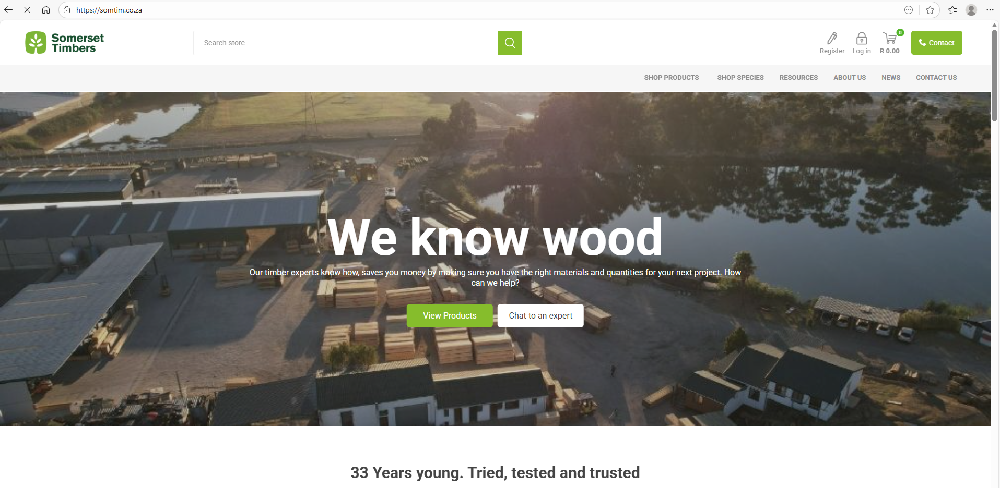
- Desktop or laptop: Click on the registration icon at the top of the website to begin.
- Mobile device: Tap the person-shaped icon, then select Register.
You will be taken to our registration form where you can enter your details. Completing all fields helps us ensure we have the correct contact and delivery information, allowing us to process your orders accurately and efficiently. The more complete your details, the smoother your shopping experience will be.
Step 2: Verify your account
Once you have submitted your registration, a verification link will be sent to your email inbox. Click the link to verify your account. You will then be redirected back to the Somerset Timbers home page, where you can log in using your email address and password and start shopping straight away.
Happy shopping!
Hints and tips
General
- Use the My Account icon to view and manage your account details, previous orders, saved addresses, back-in-stock subscriptions, and password settings.
- You can click on the shopping cart icon at any time to review items you have added to your cart, update quantities, and view your order summary before checking out.
Checkout process
Once you have added your items to the cart, the checkout process is completed in four simple steps:
- Order summary
Review the products in your cart, adjust quantities if needed, and agree to our terms of service before continuing to checkout. - Delivery or collection
Choose whether you would like your order delivered or collected. Your default delivery address will be the one provided during registration, but this can be edited if required. You can also add special instructions for our sales team or delivery drivers. - Final review
View your final order summary, including all applicable fees. This will include a delivery fee if delivery has been selected. - Secure payment
You will be redirected to our secure payment portal to enter your card details and complete payment.
Once payment is complete, you will receive an order confirmation email. Our team will begin processing your order immediately and may contact you if there are special instructions or if we need to clarify any details, giving you added peace of mind.
We are here to help
Somerset Timbers is built on delivering outstanding customer service within the timber supply industry. If you would prefer to speak to someone directly, our knowledgeable sales team is always available to assist you by phone or email. Please do not hesitate to get in touch if you need any help along the way.


 Comalytics